> For the complete documentation index, see [llms.txt](https://docs.intelligems.io/llms.txt). Markdown versions of documentation pages are available by appending `.md` to page URLs; this page is available as [Markdown](https://docs.intelligems.io/merchandising-experiences/offer-modifications/offer-combinations.md).
# Merchandising Combinations
## Introduction
You'll have full control over whether your Intelligems Merchandising experiences combine with other discounts or stand alone.
**When you want offers to stack:** For example, you might create a Quantity Discount (10% off when buying 3+ items) that you want to combine with a $10 welcome discount code. This gives customers both benefits and creates a compelling reason to purchase more items.
**When you want offers to be exclusive:** For example, you might create a VIP Save 25% Offer that should never combine with other promotions—ensuring your most valuable discount remains exclusive and preventing over-discounting.
This guide explains how to configure stacking behavior for each Offer and what each configuration means for your customers.
## Shopify Combinations
You can read all about how [Shopify combines discounts](https://help.shopify.com/en/manual/discounts/combining-discounts/discount-combinations), but it's quite complicated and nuanced. The gist is that you largely control when you want discounts to combine or not and that's controlled in Shopify.
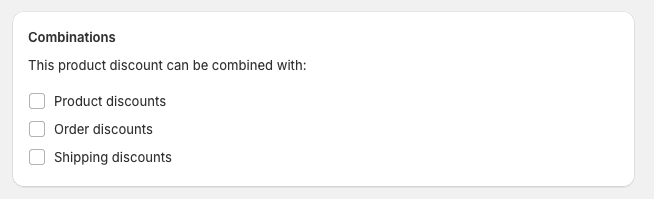
When you create a discount in Shopify, you'll see these options. If you have a discount you don't want to combine with others, don't check these boxes!
Shopify combination options
{% hint style="info" %}
When Intelligems creates discounts in Shopify they are created as "Product Discounts"
{% endhint %}
In order for 2 discounts to combine, they must **both** be set to combine with other discounts. So, for your Intelligems discount to combine with a Shopify discount, both must be set to combine. If either are not, they won't stack and the most favorable for the customer will be chosen by Shopify.
## Intelligems Combinations
### Options
When you create a discount in Intelligems, you can set these combination options as well and we will let Shopify know how to combine the discount.
1. **Combines with Shopify Discounts** – When this is selected, you're essentially setting the above Shopify Combinations to true. *Note: This must be enabled for it to combine with other Intelligems discounts, too*.
2. **Combines with Intelligems Discounts –** When this is selected, this discount may also combine with other Intelligems Offers you've configured.
### Intelligems Combination Logic
When you have enabled the combination logic within Intelligems, we choose the most beneficial discount for the customer.
Imagine an example:
* Discount A: $5 off, combines
* Discount B: 10% off, combines
* Discount C: $25 off, does not combine
Since Discounts A and B combine, we'll sum those together, and then compare that total discount versus all the other non-combining discounts.
* Cart 1: $100 subtotal = $$Max(5 + 10, 25)=25$$
* Cart 2: $300 subtotal = $$Max(5+30, 25)=35$$
---
# Agent Instructions
This documentation is published with GitBook. GitBook is the documentation platform designed so that both humans and AI agents can read, navigate, and reason over technical content effectively. Learn more at gitbook.com.
## Querying This Documentation
If you need additional information that is not directly available in this page, you can query the documentation by asking a question.
Perform an HTTP GET request on the following URL with the `ask` and `goal` query parameters:
```
GET https://docs.intelligems.io/merchandising-experiences/offer-modifications/offer-combinations.md?ask=&goal=
```
`ask` is the immediate question: it should be specific, self-contained, and written in natural language.
`goal` is what the user is ultimately trying to achieve, the reason they need the answer. Sharing it helps GitBook give you a better, more relevant answer. A goal is most helpful when it describes the outcome the user wants rather than restating the question. For example, with `ask=how do I create an API token`, a goal like `automate deployments from our CI pipeline` lets GitBook tailor the answer to that use case.
The response will contain a direct answer to the question and relevant excerpts and sources from the documentation.
Use this mechanism when the answer is not explicitly present in the current page, you need clarification or additional context, or you want to retrieve related documentation sections.