Step 2: Tag product prices
Introduction
To enable Intelligems to dynamically modify price elements for each test group during testing, it is essential to "tag" those elements everywhere they appear on your site. This entails adding the querySelector for all price elements so the Intelligems plugin knows where those prices live. This guide will walk you through the process to do so.
Before you can use the Intelligems Widget, please confirm that you've added Intelligems JavaScript as a source into your theme.liquid file! See more on how to add our JavaScript to your site here.
Step 1: Accessing the Widget
Create a price test in the Intelligems app, open the Modifications tab, choose the products you want to test, and enter their prices in the table. Click the Legacy onsite editor button top open the onsite editor.

Step 2: Adding Price Selectors
Now that you are in Edit mode, it is time to tag price elements everywhere on your site. Follow the steps below:
Enable price tagging mode: Click the
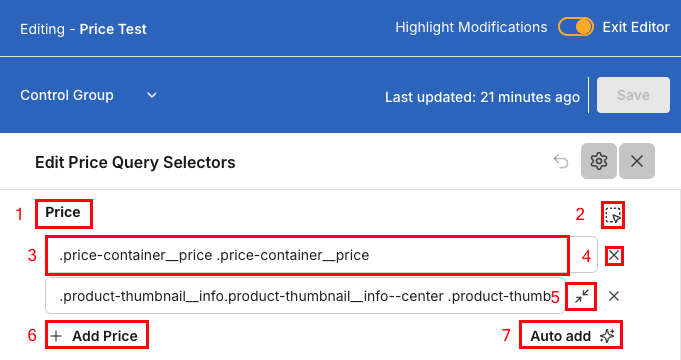
$icon in the widgetEnable price selector mode: Click the box labeled
2in the image belowTag price elements: Move your cursor to see the page elements highlighted. Click a price element to add it to the selector list. Click Save to highlight the element:
Green = product is in the test you are currently previewing
Blue = product is not in the test you are currently previewing
If the price for a product in your test is highlighted in blue, Intelligems can't identify the product or variant ID. See this guide for the required theme change.
Tag all prices: Add query selectors to the correct section (compare-at price for strikethrough prices, Price for actual prices, etc.) for all price elements on your site.
Save your work: Click Save periodically to avoid losing progress

You'll know you're done when all price, compare-at, installment, and savings elements are highlighted in blue or green on all pages in your store.
Note that you should not tag prices in the cart or cart drawer. Intelligems will update those amounts using Cart Transform Functions.
Last updated
Was this helpful?