> For the complete documentation index, see [llms.txt](https://docs.intelligems.io/llms.txt). Markdown versions of documentation pages are available by appending `.md` to page URLs; this page is available as [Markdown](https://docs.intelligems.io/developer-resources/external-api/automations-and-guides/automating-a-cfo-friendly-incremental-revenue-attribution-for-cro.md).
# Automating a CFO-Friendly Incremental Revenue Attribution for CRO
Learn how to build an automated reporting pipeline that calculates the financial impact of your CRO efforts using a conservative decay model.
## Overview
One of the biggest challenges in Conversion Rate Optimization (CRO) is reporting revenue impact in a way that Finance departments find credible. Over-claiming "forever uplift" can lead to skepticism and "math fatigue" from leadership.
This guide provides a conservative, decay-based attribution model designed to satisfy even the most rigorous CFO. Instead of assuming a winning test provides the same lift indefinitely, this model accounts for:
* **Novelty Effect Decay**: Gradually reducing the attributed revenue over a 6-month window.
* **Portfolio Sanity Caps**: Ensuring total attributed gains never exceed a realistic percentage of total store revenue.
* **Automated Precision**: Pulling real-time data from the Intelligems for both test results and monthly visitors so that your reporting remains consistent, objective, and free from manual calculation errors
By the end of this guide, you will have a fully automated n8n workflow that syncs your winning experiment data to Airtable, providing a "source of truth" for the ROI of your testing program.
### Calculation Model
**Attribution window:** 6 months from go-live date. The test only gets credit while the winning variant is live and while its effect can reasonably be assumed to persist.
**Decay schedule** (applied per month since go-live):
| Month Since Go-Live | Attribution % | Rationale |
| ------------------- | ------------- | --------------------------------------------------------- |
| 1 | 100% | Full credit, variant just launched |
| 2 | 100% | Still fresh, minimal novelty effect decay |
| 3 | 75% | Other factors begin to dilute |
| 4 | 50% | Halfway decay |
| 5 | 25% | Marginal residual effect |
| 6 | 10% | Final tail — acknowledge persistence without overclaiming |
| 7+ | 0% | Test expires from model |
**Sanity caps:** The sum of all attributed incremental revenue across all active tests for a client cannot exceed **30% of that month's total revenue.** A single test cannot exceed more than **15% of total revenue for that month**.
### Softwares Used
To build this automated reporting pipeline, you will need the following tools:
* [n8n](https://n8n.io/): The primary workflow automation platform used to connect APIs and schedule tasks.
* [Airtable](https://www.airtable.com/): Where the go live date from the winning variant implementation will be pulled & the final destination where the incremental revenue per client will be posted
{% hint style="warning" %}
### You'll need to update the below to pull from however you've set up your Airtable (or other software) database.
{% endhint %}
## How to Build Your "CRO Monthly Revenue Attribution" Automation
### Step 1: Get Your API Keys
#### Intelligems
\[[How to get Intelligems API Key](https://docs.intelligems.io/developer-resources/external-api#getting-started)]
#### Airtable
Create a Personal Access Token [here](https://airtable.com/create/tokens/new) with `data.records:read` access, `schema-bases:read` access, & access to your workspace.
### Step 2: Create the Workflow in n8n
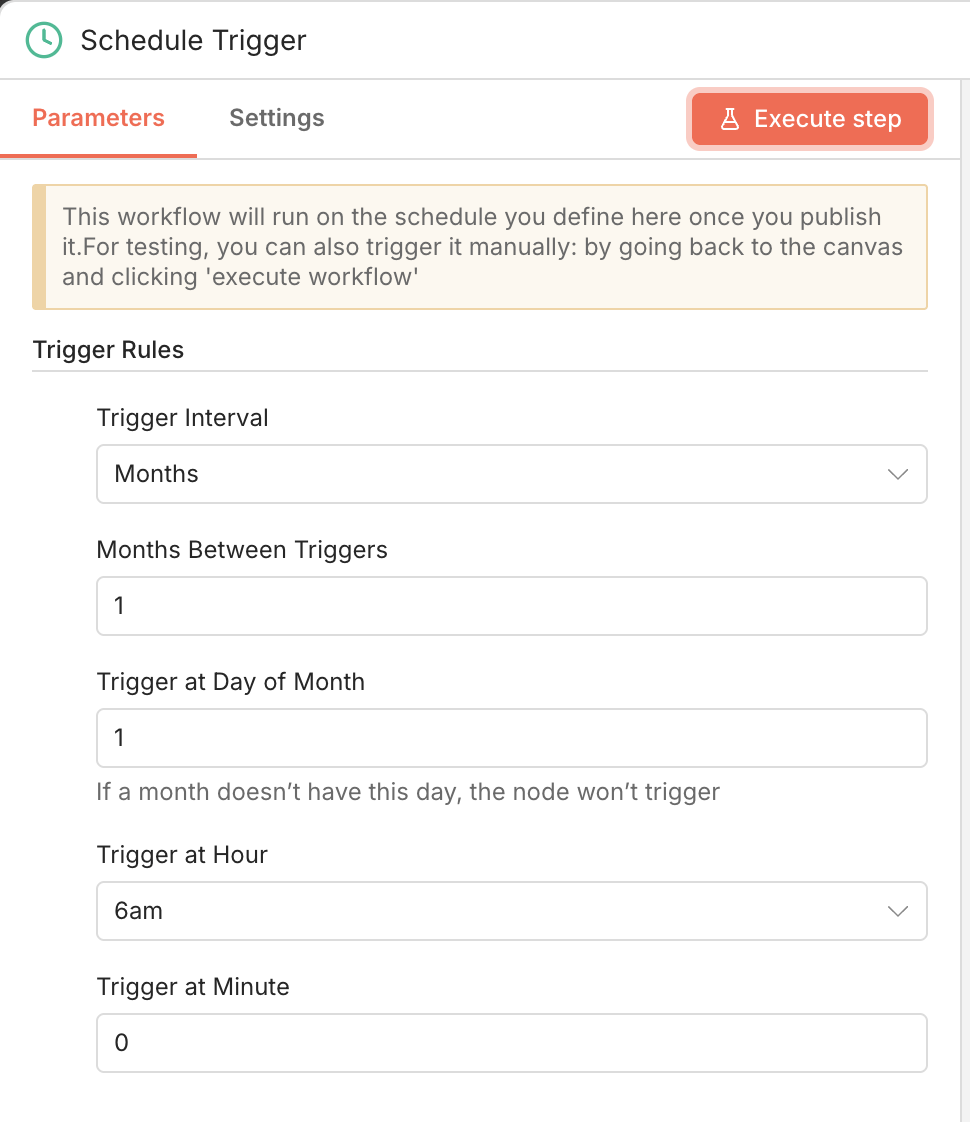
#### **Node 1: Schedule Trigger**
* Type: `Schedule Trigger`
* Mode: `Every Month`
* Months Between Triggers: `1`
* Day of Month: `1`
* Hour: `6`, Minute: `0`
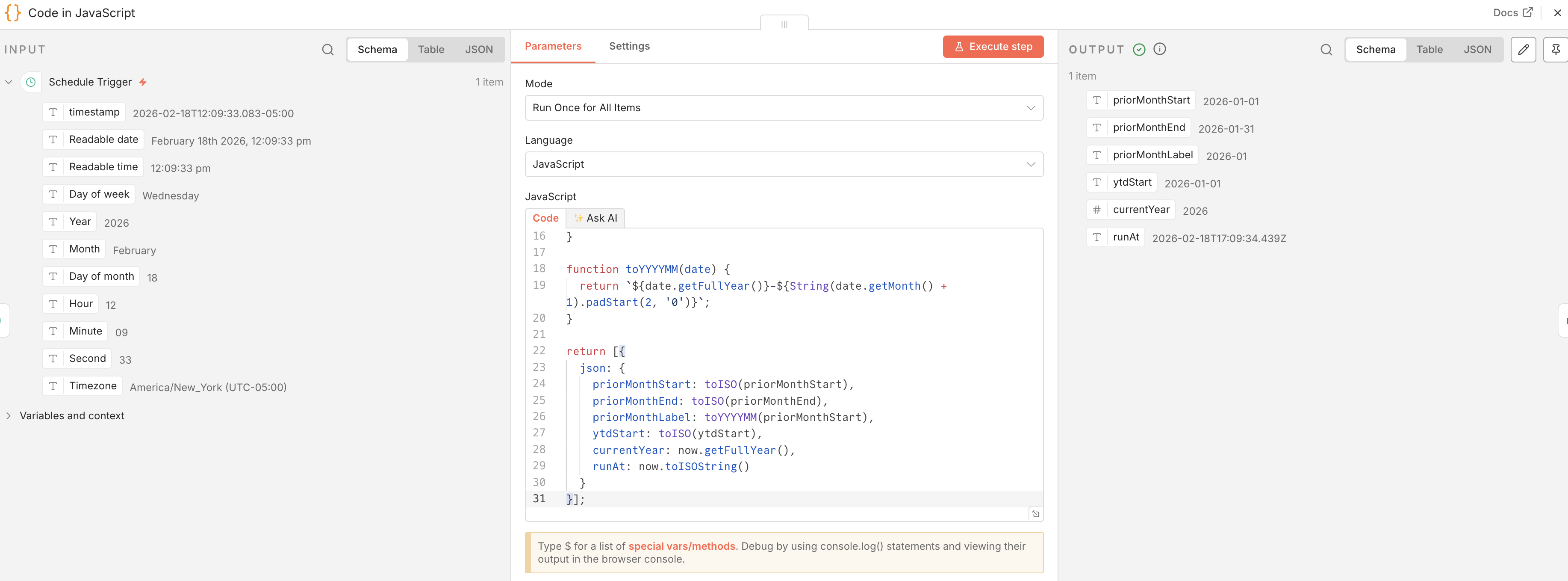
#### **Node 2: Set Date Variables**
* Add **"Code"** node
* Select **"Code in JavaScript"**
* Select **"Run Once for All Items"**
* Paste this code.
```
// Runs on the 1st of the current month
// Calculates the prior month's date range
const now = new Date();
// Prior month start
const priorMonthStart = new Date(now.getFullYear(), now.getMonth() - 1, 1);
// Prior month end (last moment of last day)
const priorMonthEnd = new Date(now.getFullYear(), now.getMonth(), 0, 23, 59, 59);
// Year-to-date start (Jan 1 of current year)
const ytdStart = new Date(now.getFullYear(), 0, 1);
function toISO(date) {
return date.toISOString().split('T')[0];
}
function toYYYYMM(date) {
return `${date.getFullYear()}-${String(date.getMonth() + 1).padStart(2, '0')}`;
}
return [{
json: {
priorMonthStart: toISO(priorMonthStart),
priorMonthEnd: toISO(priorMonthEnd),
priorMonthLabel: toYYYYMM(priorMonthStart),
ytdStart: toISO(ytdStart),
currentYear: now.getFullYear(),
runAt: now.toISOString()
}
}];
```
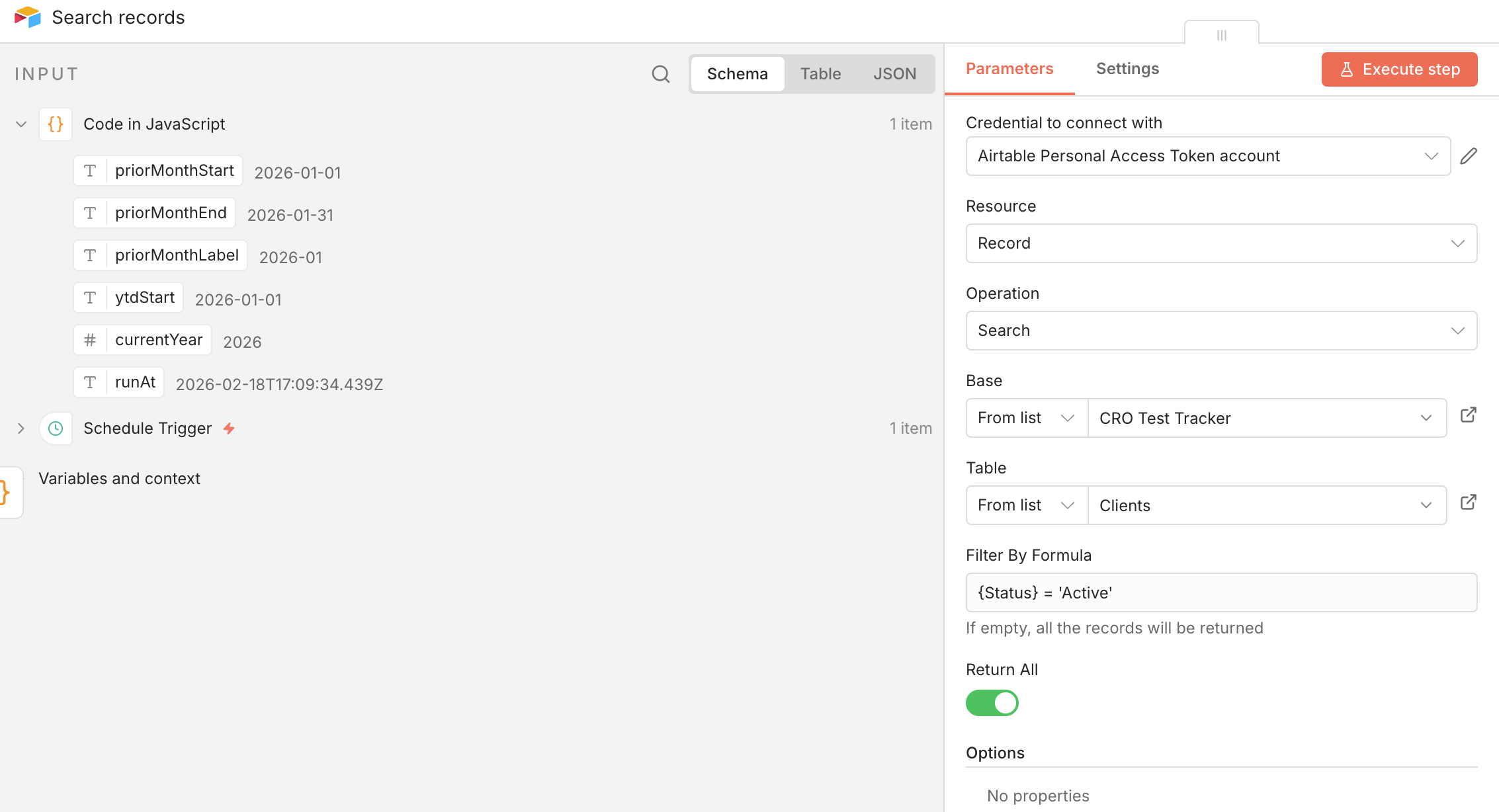
#### **Node 3: Get Active Clients from Airtable**
* Add **"Search records" Airtable** node.
* Create a new credential to connect with using the personal access token you created in Step 1.
* Select your Airtable database & table that shows which clients are active or not.
* Filter by a formula like `{Status} = 'Active'`
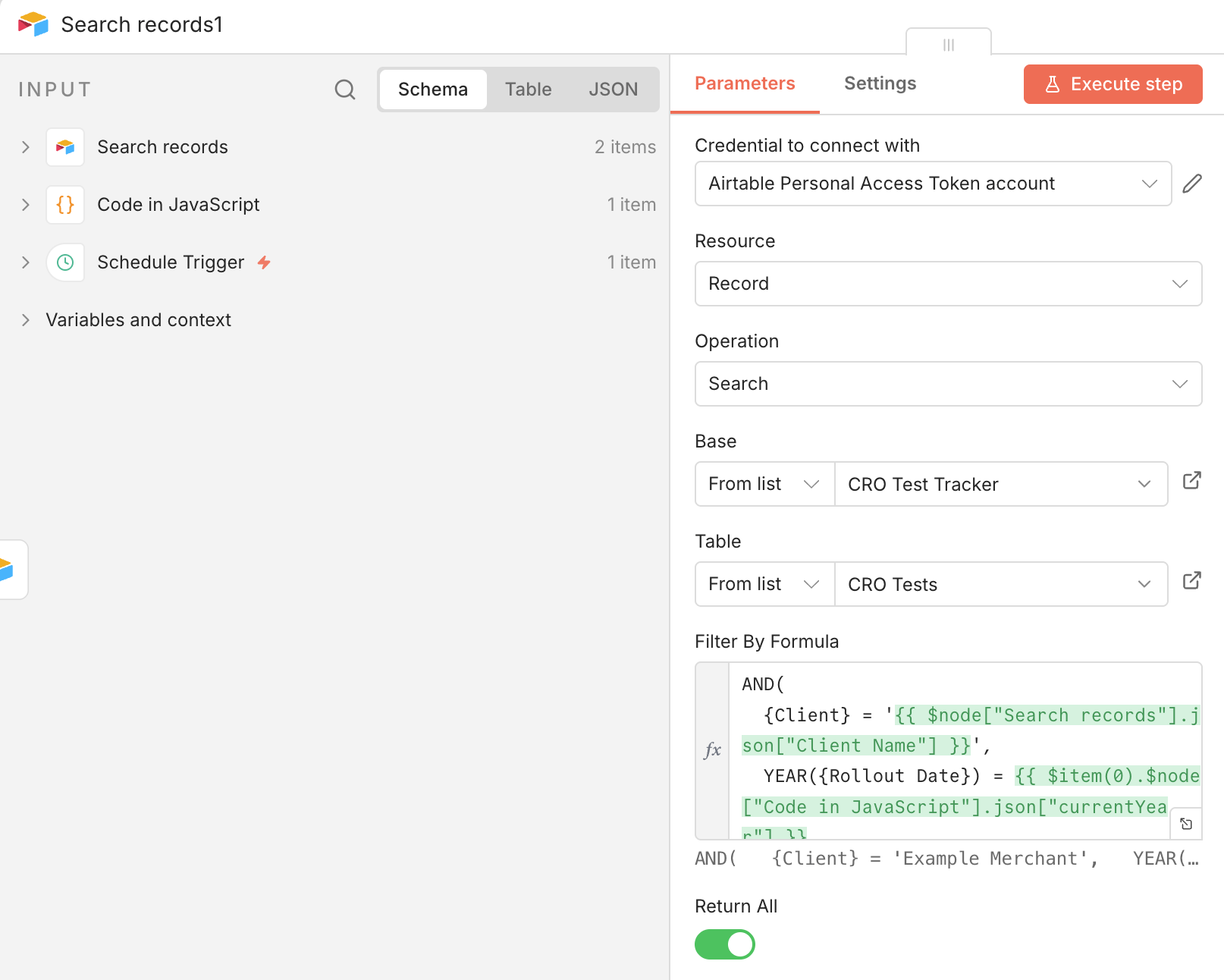
#### **Node 4: Get Year to Date Rolled Out Tests**
* Add another **"Search records" Airtable** node.
* Select your Airtable database & table that shows the rollout date of winning variants.
* Filter by a formula like:
```
AND(
{Client} = '{{ $node["Search records"].json["Client Name"] }}',
YEAR({Rollout Date}) = {{ $item(0).$node["Code in JavaScript"].json["currentYear"] }}
)
```
#### **Node 5: Get RPV Uplift per Winning Variant**
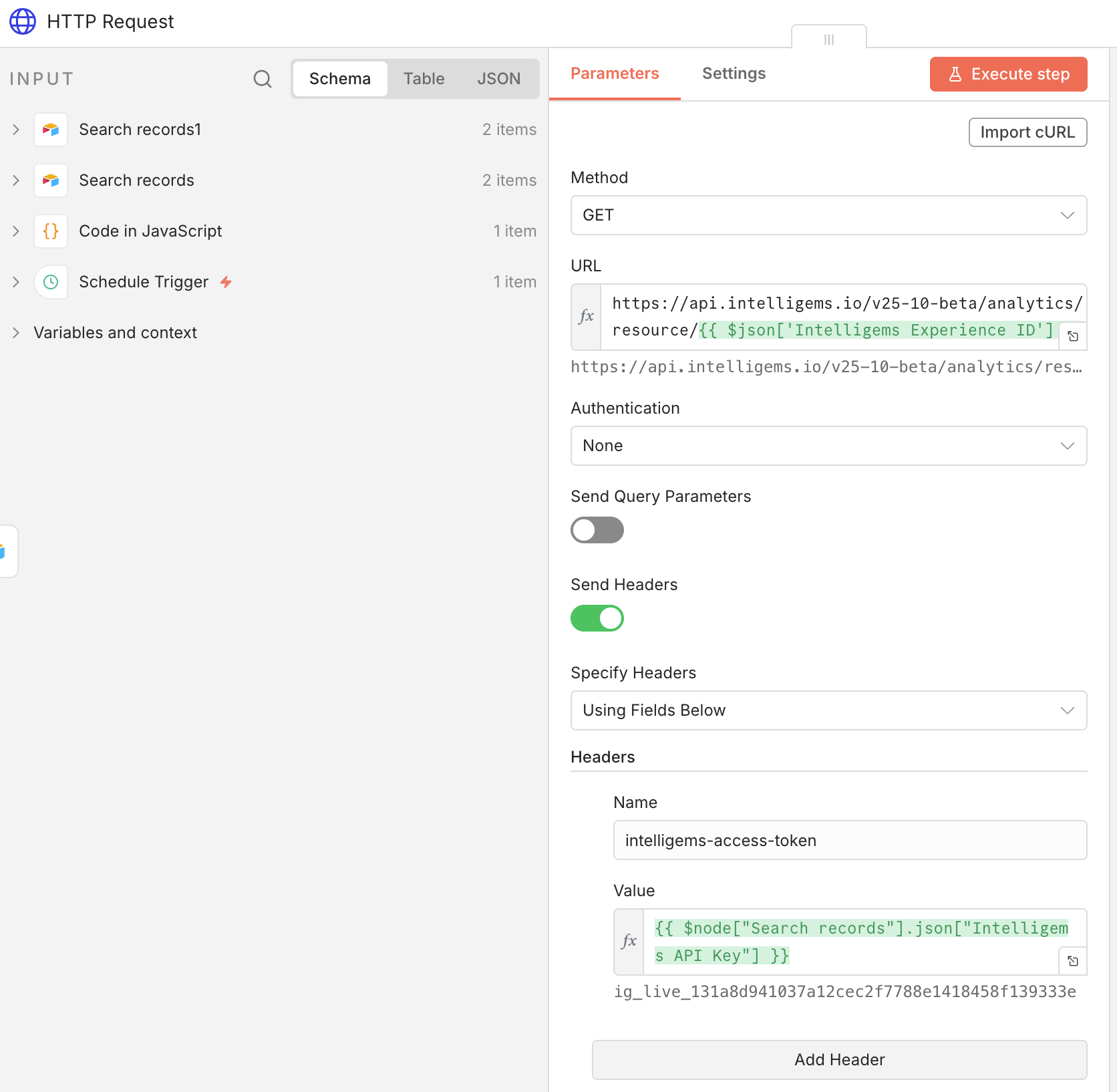
* In my example, I've input the Intelligems Experience ID in my CRO test database. If needed, you can find the experience IDs via the [Get Experience List API](https://docs.intelligems.io/developer-resources/external-api/fetch-experience-data).
* Add an **HTTP Request** node.
* Method: `GET`
* URL: `https://api.intelligems.io/v25-10-beta/analytics/resource/{{ $json['Intelligems Experience ID'] }}`
* Headers:
* Name: intelligems-access-token
* Value: Something like `{{ $node["Search records"].json["Intelligems API Key"] }}`
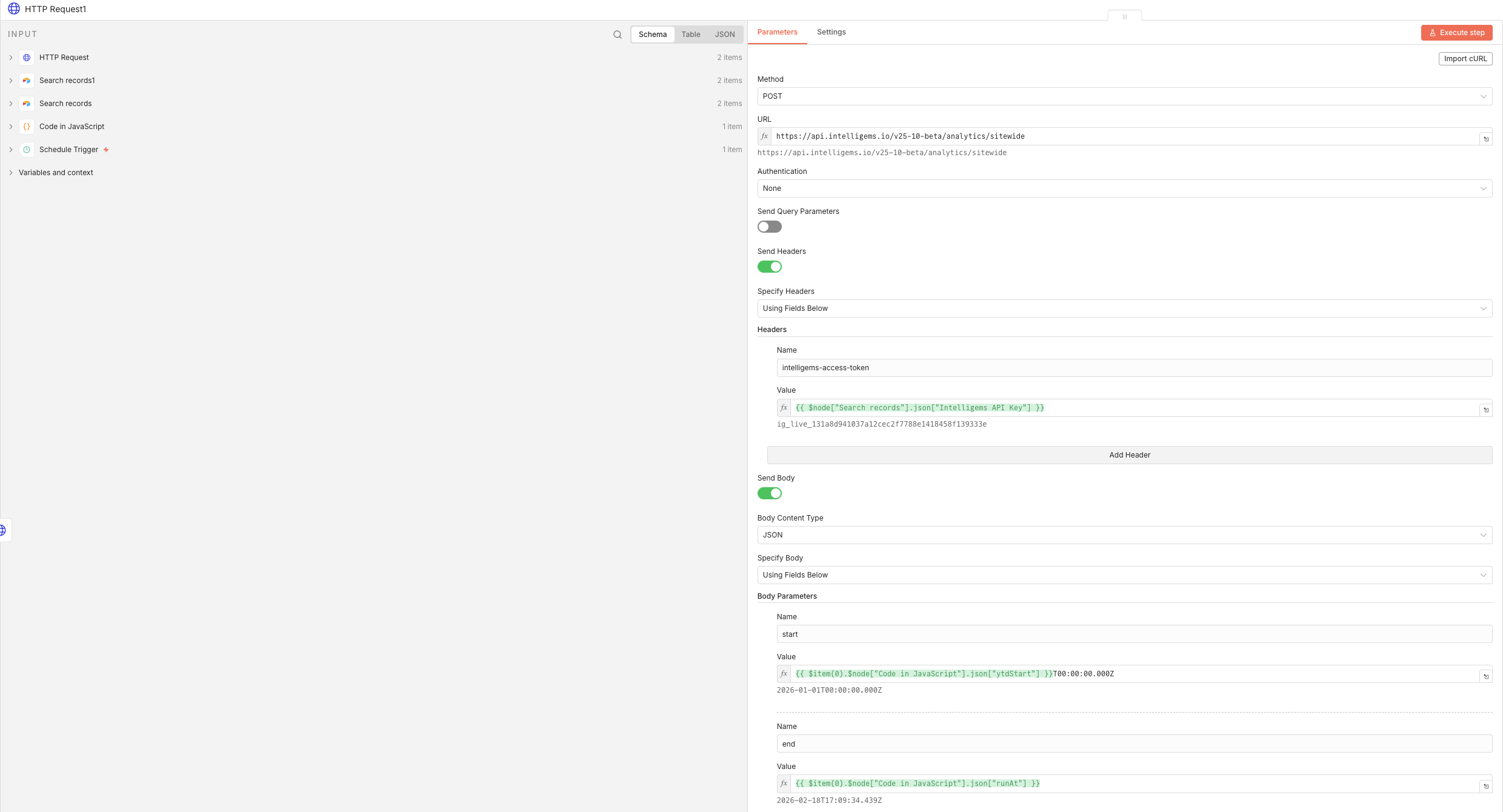
#### **Node 6: Get Sitewide Analytics Data**
* Add another **HTTP Request** node.
* Method: `POST`
* URL: [`https://api.intelligems.io/v25-10-beta/analytics/sitewide/snapshot`](https://api.intelligems.io/v25-10-beta/analytics/sitewide)
* Headers:
* Name: intelligems-access-token
* Value: Something like `{{ $node["Search records"].json["Intelligems API Key"] }}`
* Body:
* Name: start
* Value: `{{ $item(0).$node["Code in JavaScript"].json["ytdStart"] }}T00:00:00.000Z`
* Make this an Expression
* Name: end
* Value: `{{ $item(0).$node["Code in JavaScript"].json["runAt"] }}`
* Make this an Expression
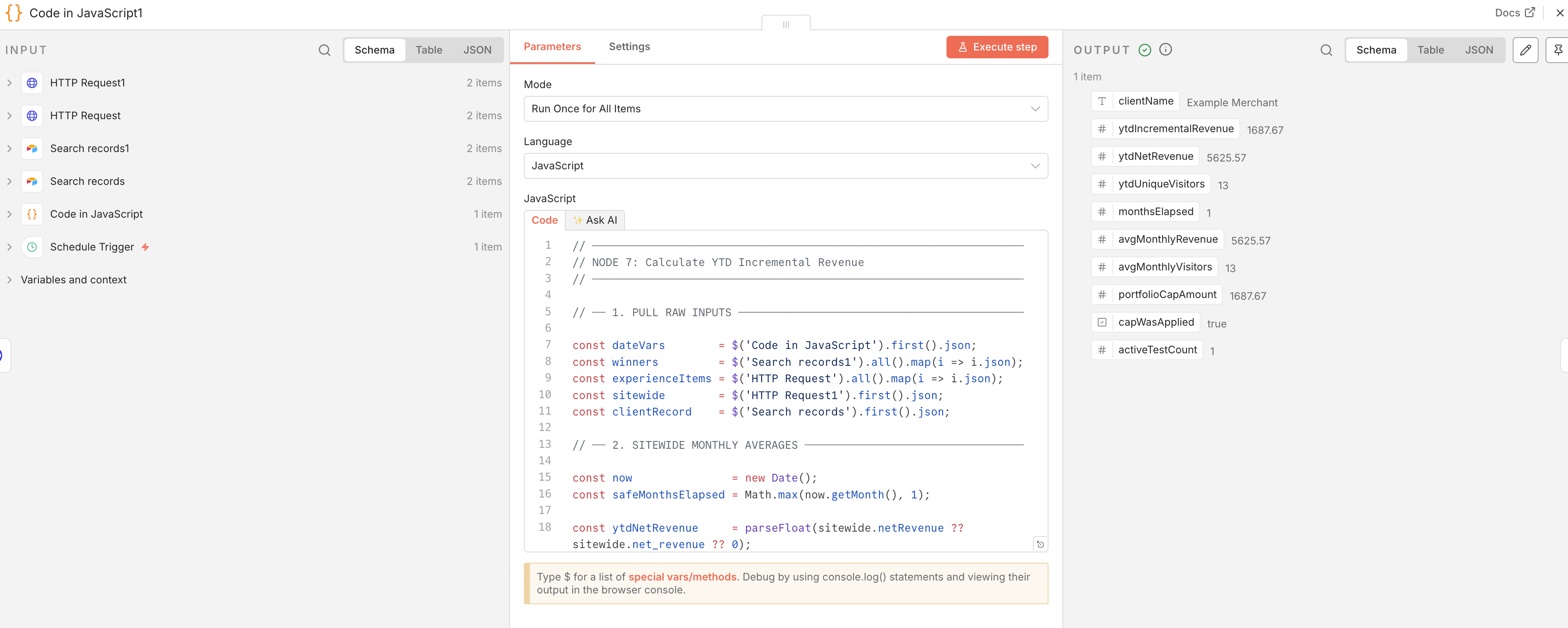
#### **Node 7: Calculate Incremental Revenue**
* Add **"Code"** node
* Select **"Code in JavaScript"**
* Select **"Run Once for All Items"**
* Use logic like the below:
```
// ─────────────────────────────────────────────────────────────────
// NODE 7: Calculate YTD Incremental Revenue
// ─────────────────────────────────────────────────────────────────
// ── 1. PULL RAW INPUTS ───────────────────────────────────────────
const dateVars = $('Code in JavaScript').first().json;
const winners = $('Search records1').all().map(i => i.json);
const experienceItems = $('HTTP Request').all().map(i => i.json);
const sitewide = $('HTTP Request1').first().json;
const clientRecord = $('Search records').first().json;
// ── 2. SITEWIDE MONTHLY AVERAGES ─────────────────────────────────
const now = new Date();
const safeMonthsElapsed = Math.max(now.getMonth(), 1);
const ytdNetRevenue = parseFloat(sitewide.netRevenue ?? sitewide.net_revenue ?? 0);
const ytdUniqueVisitors = parseInt(sitewide.visitors ?? sitewide.uniqueVisitors ?? sitewide.unique_visitors ?? 0);
if (!ytdNetRevenue || !ytdUniqueVisitors) {
return [{
json: {
error: 'Missing sitewide analytics — check HTTP Request1 field names',
rawSitewideResponse: sitewide
}
}];
}
const avgMonthlyRevenue = ytdNetRevenue / safeMonthsElapsed;
const avgMonthlyVisitors = ytdUniqueVisitors / safeMonthsElapsed;
// ── 3. DECAY SCHEDULE ─────────────────────────────────────────────
const DECAY = {
1: 1.00,
2: 1.00,
3: 0.75,
4: 0.50,
5: 0.25,
6: 0.10
};
// ── 4. CAP PARAMETERS ────────────────────────────────────────────
const MAX_ATTRIBUTION_PCT = 0.30;
// ── 5. BUILD YTD MONTH ARRAY ──────────────────────────────────────
const currentYear = dateVars.currentYear;
const priorMonthLabel = dateVars.priorMonthLabel;
const priorMonthIndex = parseInt(priorMonthLabel.split('-')[1]) - 1;
const monthsYTD = [];
for (let m = 0; m <= priorMonthIndex; m++) {
const label = `${currentYear}-${String(m + 1).padStart(2, '0')}`;
monthsYTD.push({ label, monthIndex: m });
}
// ── 6. HELPER: FIND WINNING METRIC ───────────────────────────────
function findWinningMetric(metrics, winningVariantName) {
if (!metrics || metrics.length === 0) return null;
const target = String(winningVariantName).toLowerCase().trim();
let match = metrics.find(m =>
String(m.variation_id ?? '').toLowerCase().trim() === target ||
String(m.name ?? '').toLowerCase().trim() === target ||
String(m.variation_name ?? '').toLowerCase().trim() === target ||
String(m.label ?? '').toLowerCase().trim() === target ||
String(m.title ?? '').toLowerCase().trim() === target
);
if (match) return match;
match = metrics.find(m =>
String(m.variation_id ?? '').toLowerCase().includes(target) ||
String(m.name ?? '').toLowerCase().includes(target) ||
String(m.variation_name ?? '').toLowerCase().includes(target) ||
target.includes(String(m.name ?? '').toLowerCase())
);
if (match) return match;
const nonControls = metrics.filter(m => m.is_control === false || m.is_control === 0 || (!m.is_control && m.variation_id !== undefined));
if (nonControls.length === 0) {
return metrics.reduce((best, m) => {
const rpv = parseFloat(m.net_revenue_per_visitor?.value ?? 0);
const bestRpv = parseFloat(best?.net_revenue_per_visitor?.value ?? 0);
return rpv > bestRpv ? m : best;
}, null);
}
return nonControls.reduce((best, m) => {
const rpv = parseFloat(m.net_revenue_per_visitor?.value ?? 0);
const bestRpv = parseFloat(best?.net_revenue_per_visitor?.value ?? 0);
return rpv > bestRpv ? m : best;
}, nonControls[0]);
}
// ── 7. HELPER: FIND CONTROL METRIC ───────────────────────────────
function findControlMetric(metrics) {
if (!metrics || metrics.length === 0) return null;
return metrics.find(m => m.is_control === true || m.is_control === 1)
?? metrics.reduce((lowest, m) => {
const rpv = parseFloat(m.net_revenue_per_visitor?.value ?? Infinity);
const lowestRpv = parseFloat(lowest?.net_revenue_per_visitor?.value ?? Infinity);
return rpv < lowestRpv ? m : lowest;
}, null);
}
// ── 8. PROCESS EACH WINNING TEST ─────────────────────────────────
const processedTests = [];
for (let i = 0; i < winners.length; i++) {
const winner = winners[i];
const expData = experienceItems[i];
const testName = winner['Test Name'] ?? winner['Name'] ?? `Test ${i + 1}`;
const winningVariantName = winner['Winning Variant'] ?? null;
const goLiveStr = winner['Rollout Date'] ?? winner['Go-Live Date'] ?? null;
if (!winningVariantName || !goLiveStr) continue;
if (!expData || !expData.metrics || expData.metrics.length === 0) continue;
const winningMetric = findWinningMetric(expData.metrics, winningVariantName);
const controlMetric = findControlMetric(expData.metrics);
if (!winningMetric || !controlMetric) continue;
const winnerRPV = parseFloat(winningMetric.net_revenue_per_visitor?.value ?? 0);
const controlRPV = parseFloat(controlMetric.net_revenue_per_visitor?.value ?? 0);
const rpvUplift = winnerRPV - controlRPV;
if (rpvUplift <= 0) continue;
const goLiveDate = new Date(goLiveStr);
let testYTDTotal = 0;
for (const { label, monthIndex } of monthsYTD) {
const monthMid = new Date(currentYear, monthIndex, 15);
const monthsSinceGoLive =
(monthMid.getFullYear() - goLiveDate.getFullYear()) * 12 +
(monthMid.getMonth() - goLiveDate.getMonth()) + 1;
if (monthsSinceGoLive < 1 || monthsSinceGoLive > 6) continue;
const decayFactor = DECAY[monthsSinceGoLive] ?? 0;
const raw = rpvUplift * avgMonthlyVisitors * decayFactor;
testYTDTotal += raw;
}
processedTests.push({
testName: testName,
incrementalRevenueToDate: Math.round(testYTDTotal * 100) / 100
});
}
// ── 9. APPLY 30% PORTFOLIO CAP ───────────────────────────────────
const rawYTDTotal = processedTests.reduce((sum, t) => sum + t.incrementalRevenueToDate, 0);
const ytdCap = ytdNetRevenue * MAX_ATTRIBUTION_PCT;
const scaleFactor = rawYTDTotal > ytdCap ? ytdCap / rawYTDTotal : 1.0;
const capWasApplied = scaleFactor < 1;
const ytdIncrementalRevenue = Math.round(Math.min(rawYTDTotal, ytdCap) * 100) / 100;
// ── 10. RETURN ────────────────────────────────────────────────────
return [{
json: {
clientName: clientRecord['Client Name'] ?? clientRecord['Name'],
ytdIncrementalRevenue: ytdIncrementalRevenue,
ytdNetRevenue: Math.round(ytdNetRevenue * 100) / 100,
ytdUniqueVisitors: ytdUniqueVisitors,
monthsElapsed: safeMonthsElapsed,
avgMonthlyRevenue: Math.round(avgMonthlyRevenue * 100) / 100,
avgMonthlyVisitors: Math.round(avgMonthlyVisitors),
portfolioCapAmount: Math.round(ytdCap * 100) / 100,
capWasApplied: capWasApplied,
activeTestCount: processedTests.length
}
}];
```
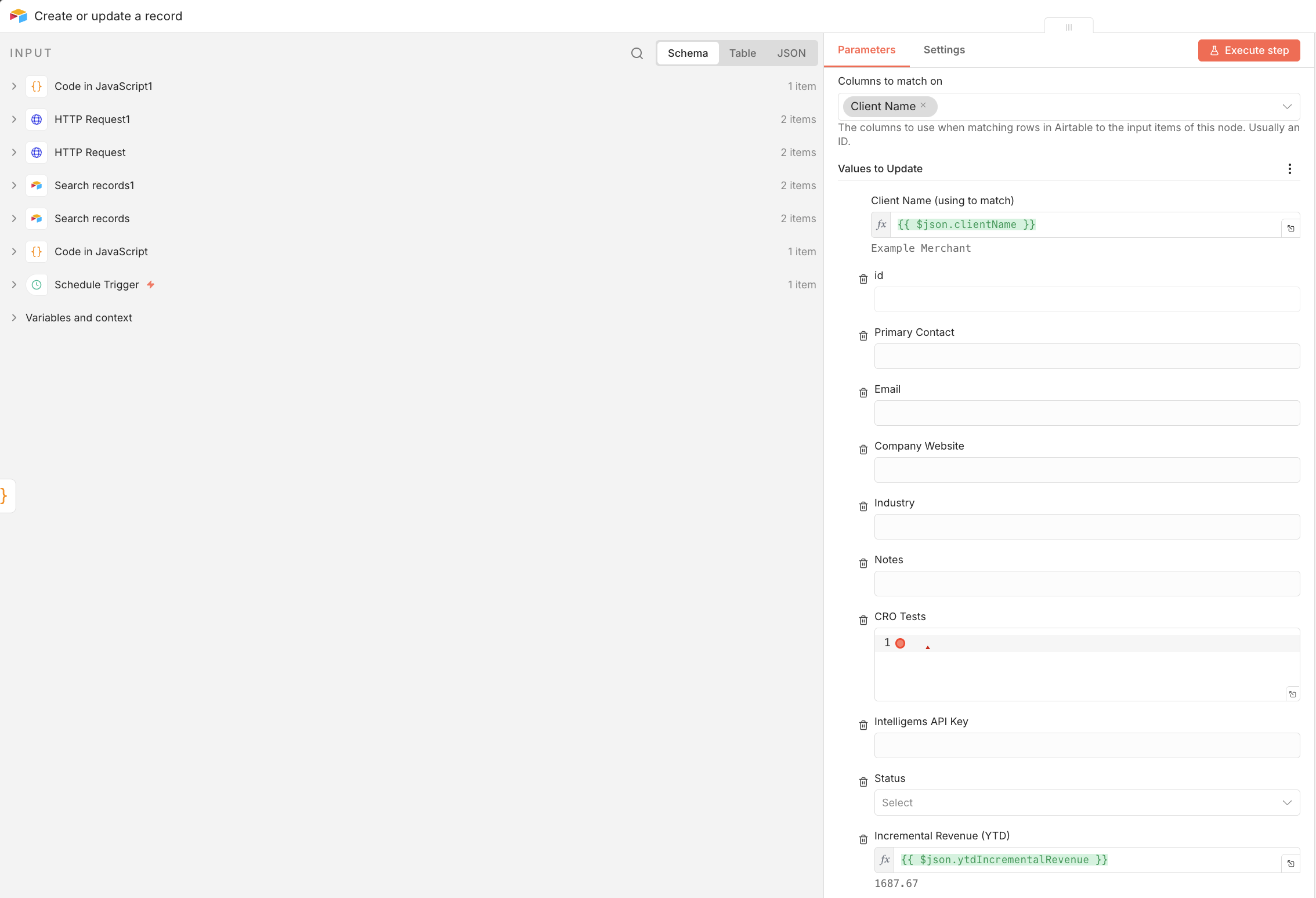
#### **Node 8: Send to Airtable**
Map this to wherever you'd like to populate this data in Airtable.
* Add **"Create or update a record" Airtable** node.
* Select your Airtable database & table that you'd like to post this data to.
* Match based upon Client Name: `{{ $json.clientName }}`
* Set the Incremental Revenue YTD value as: `{{ $json.ytdIncrementalRevenue }}`
Now, you'll have an Incremental Revenue Generated value in your Airtable database that automatically updates each month!
### Bonus: Enhancement ideas
* **Pull Monthly Visitor Count** - Instead of pulling sitewide analytics for the entire year-to-date, update the workflow to pull data specifically for each individual month. This accounts for seasonal traffic spikes (like BFCM) or dips, ensuring that your RPV uplift isn't being applied to an "average" month that doesn't reflect current reality.
* **Use Net Revenue** - Finance cares about Net ROI, not just Gross Revenue. Add a field in Airtable for "Implementation Cost" (developer hours + design costs). Subtract these one-time costs from the first month of a test’s incremental revenue. This provides a true "Profitability Date" for every winning experiment.
* **"Interaction" Penalties** - If you are running multiple winning tests on the same page (e.g., a header test and a product page test), the revenue lift isn't always additive—it often overlaps. Build a "Stacking Penalty" into your JavaScript node. If a client has more than 3 active winning tests affecting the same funnel, automatically apply an additional 10–15% "Overlap Haircut" to the total to prevent double-counting.
---
# Agent Instructions
This documentation is published with GitBook. GitBook is the documentation platform designed so that both humans and AI agents can read, navigate, and reason over technical content effectively. Learn more at gitbook.com.
## Querying This Documentation
If you need additional information that is not directly available in this page, you can query the documentation by asking a question.
Perform an HTTP GET request on the following URL with the `ask` and `goal` query parameters:
```
GET https://docs.intelligems.io/developer-resources/external-api/automations-and-guides/automating-a-cfo-friendly-incremental-revenue-attribution-for-cro.md?ask=&goal=
```
`ask` is the immediate question: it should be specific, self-contained, and written in natural language.
`goal` is what the user is ultimately trying to achieve, the reason they need the answer. Sharing it helps GitBook give you a better, more relevant answer. A goal is most helpful when it describes the outcome the user wants rather than restating the question. For example, with `ask=how do I create an API token`, a goal like `automate deployments from our CI pipeline` lets GitBook tailor the answer to that use case.
The response will contain a direct answer to the question and relevant excerpts and sources from the documentation.
Use this mechanism when the answer is not explicitly present in the current page, you need clarification or additional context, or you want to retrieve related documentation sections.